Vermont gives you a three-month window to file your annual report, and most LLC owners wait until the last possible day—March 31st. At $45, it’s not expensive. The online system works fine. So why do so many Vermont LLCs end up terminated by June 30th?
Simple: Tax season brain. While you’re scrambling with federal taxes, that Vermont annual report gets forgotten. By the time you remember in May, you’re already late.
I’ve helped resurrect dozens of terminated Vermont LLCs. Let me show you why Vermont’s generous filing window actually creates problems, how their new online system works (spoiler: your old login is dead), and how to never miss this deadline again.
Vermont’s Annual Report: Reasonable Fee, Tricky Timeline
Here’s what you’re actually dealing with:
The essentials:
- Cost: $45 flat fee
- Filing window: January 1 – March 31 (for most LLCs)
- Grace period: Until June 30th
- Termination: After June 30th
- Reinstatement: $80 per missed year
Vermont’s $45 fee is fair—cheaper than Maine ($85), way cheaper than Tennessee ($300). The problem isn’t the money. It’s the timing.
The Three-Month Window Trap
Vermont thinks they’re being generous with a three-month filing window. In reality, it creates procrastination problems:
Why January 1 – March 31 Fails
January: “I have three months, no rush”
February: “Still plenty of time”
March 1-15: “I’ll do it after I organize tax documents”
March 16-30: “Wait, is that due soon?”
March 31: “OH NO!” (website crashes from everyone filing)
The psychology: Deadlines three months away feel like forever. Then suddenly they’re tomorrow.
The Fiscal Year Confusion
Most LLCs use calendar year (January – December), making the deadline March 31st. But if you chose a different fiscal year:
- Fiscal year ends June 30 → Due September 30
- Fiscal year ends September 30 → Due December 31
- Fiscal year ends March 31 → Due June 30
Problem: Nobody remembers what fiscal year they chose. Check your formation documents or call Vermont.
Vermont’s New Online System (Your Old Login Is Dead)
In 2025, Vermont killed their old system and launched a new one. Your old credentials? Worthless. Everyone starts fresh.
Creating Your New Account
Navigate to: bizfilings.vermont.gov/login
Step 1: Registration
- Click “Register Here” (bottom of page)
- Enter name and email
- Wait for verification code
- Check email immediately (expires in 10 minutes)
- Enter code
Common problem: Code doesn’t arrive? Check spam. Still nothing? Try different email.
Step 2: Security Setup Choose login method:
- Email one-time password (annoying but secure)
- SMS one-time password (if you trust your phone)
- Traditional password (what most people want)
My advice: Use traditional password. Write it down. You’ll use this once a year.
Step 3: Address Entry Enter mailing address. Can be any state. This is for account purposes, not LLC address.
Filing Your Vermont Annual Report Online
Once you’re logged in, here’s the actual process:
Step 1: Navigate to Reports
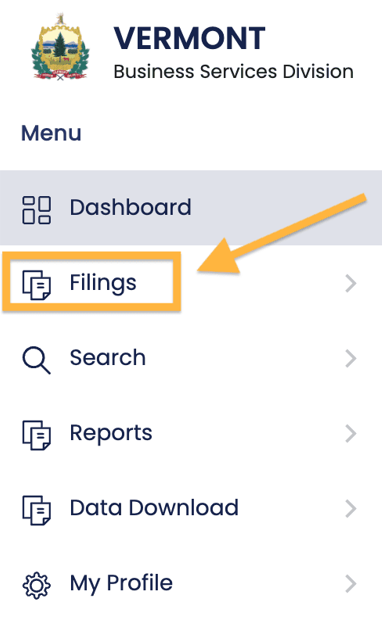
From dashboard:
- Click “Filings”
- Click “Business”
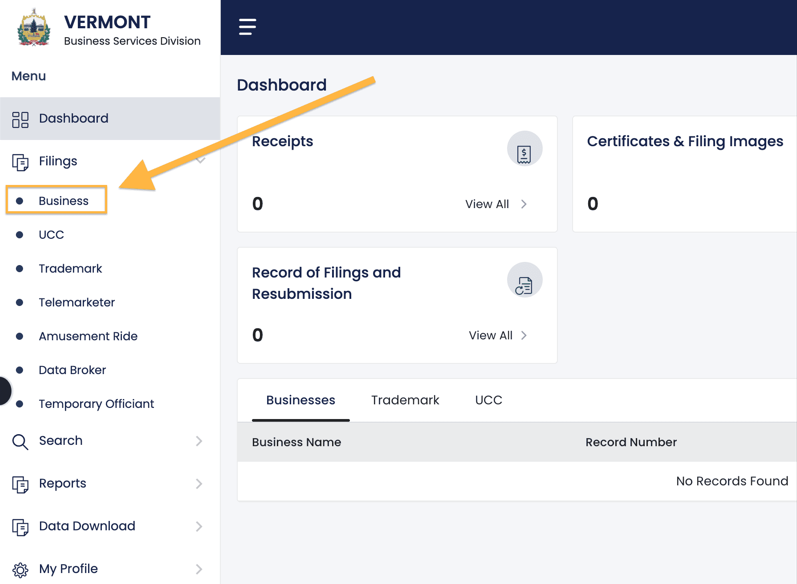
- Under “Annual/Biennial Report” click “File Now”
Navigation tip: Vermont’s menu structure is confusing. Just remember: Filings → Business → Annual Report.
Step 2: Find Your LLC
Search by name. Exact spelling not required but helps.
Can’t find your LLC?
- Try partial name search
- Remove “LLC” from search
- Check for typos in original formation
Select your LLC from results.
Step 3: Review Fees
Vermont shows your total due. If you’ve missed previous years, they’ll all show here.
Important: You must pay ALL missed years at once. No payment plans.
Example: Missed 2023 and 2024? You’ll pay $90 total ($45 × 2).
Step 4: Update Information
Business Email:
- Use email you check regularly
- This gets important notices
- Can be personal or business
Designated Office Address:
- Your principal business location
- Can be home address
- Can be any state
- No PO boxes
Mailing Address:
- Optional
- Can be PO box
- For correspondence only
Step 5: Principal Information
Vermont wants current member/manager information.
Who to list:
- Member-managed: List at least one member
- Manager-managed: List at least one manager
- Can list all or just one
Related article: Member-managed LLC vs Manager-managed LLC
Privacy note: This becomes public record. Minimize listings if privacy matters.
Adding principals:
- Click “Add”
- Choose Individual or Business
- Select Member or Manager
- Enter name and address
Removing principals:
- Click trash can icon
- Confirm deletion
Step 6: Affirmation and Payment
Affirmation:
- Check the box confirming accuracy
- Enter your name
- Enter capacity (Member, Manager, or Authorized Signer)
Payment:
- Credit card only
- No e-check option
- Processing immediate
- Confirmation email within 24 hours
What You CAN’T Change During Annual Report
Vermont restricts certain changes to separate filings:
Can’t change:
- Registered agent
- LLC name
- Articles of Organization
Must file separately:
- Statement of Change (for agent)
- Amendment (for name)
- Additional fees apply
Strategy: File annual report first, then handle changes. Don’t delay report for perfect information.
The June 30th Termination Cliff
Miss March 31st? You have until June 30th before termination. But here’s why you shouldn’t wait:
April 1 – June 29: The Danger Zone
What happens:
- Still can file normally
- Same $45 fee
- No penalties
- But risky
Why it’s dangerous:
- Tax season distraction
- Summer vacation planning
- “I’ll do it tomorrow” syndrome
- Website issues near deadline
June 30th: The Point of No Return
At 11:59 PM on June 30th, unfiled LLCs are automatically terminated.
Termination means:
- LLC legally dead
- No liability protection
- Can’t conduct business
- Contracts potentially void
- Banking problems
Reinstatement After Termination
To resurrect terminated LLC:
- File reinstatement application
- Pay $80 per year missed (not $45)
- File all missing reports
- Update all information
- Wait for processing (days to weeks)
The math: Miss one year? $80 reinstatement. Miss three years? $240. Plus loss of protection during termination.
Building Your Never-Miss System
Vermont sends reminders to registered agents, but don’t rely solely on them.
The Calendar Strategy
Set these reminders:
December 15: “Vermont report opens January 1”
January 15: “File Vermont report this month”
February 1: “Vermont report – don’t wait”
February 15: “FILE VERMONT REPORT”
March 1: “VERMONT DEADLINE MONTH”
March 15: “VERMONT – FINAL WARNING”
March 25: “VERMONT – DO IT NOW”
Excessive? Maybe. Effective? Absolutely.
The Tax Preparer Coordination
Tell your tax preparer: “Remind me about Vermont annual report when we discuss taxes.”
Many CPAs include this in their service. Ask explicitly.
The Registered Agent Solution
Quality registered agents:
- Send multiple reminders
- Some file for you
- Never let you miss
- Worth $100-200/year for peace of mind
The Buddy System
Know other Vermont LLC owners? Remind each other. Create a March 1st “file your reports” group text.
Common Vermont Annual Report Disasters
Disaster #1: The Tax Season Burial
Focus on federal taxes, forget state report. Classic March mistake.
Disaster #2: The Old Login Attempt
Spending hours trying old credentials. They’re dead. Create new account.
Disaster #3: The Fiscal Year Mystery
Can’t remember your fiscal year? Most chose calendar year. When in doubt, call Vermont.
Disaster #4: The Address Confusion
Designated office vs. mailing vs. registered agent address. Different purposes, different rules.
Disaster #5: The Principal Privacy Leak
Listing all members publicly when one would suffice. Think before you list.
Strategic Considerations
The Multi-State Timing Challenge
Own LLCs in multiple states?
- Vermont: March 31
- New Hampshire: April 1
- Maine: June 1
- Massachusetts: Anniversary date
Create master calendar or miss something.
The Inactive LLC Question
LLC doing nothing? Still must file. “Inactive” doesn’t mean “exempt.” File or terminate properly.
The Banking Verification
Banks randomly verify good standing. Terminated status can trigger:
- Account freezes
- Credit line calls
- Merchant account suspension
- Loan problems
Stay compliant for banking relationships.
The Name Protection Value
Even inactive, filing maintains name rights. Let it terminate? Name becomes available. Competitors can take it.
Vermont-Specific Features
No Expedited Service
Vermont processes in order received. No paying for priority.
Public Database
Anyone can verify your:
- Good standing status
- Principal information
- Filing history
- Registered agent
Generous Grace Period
June 30th termination gives you 3 months after March 31st. Most states give 60 days maximum.
Reasonable Reinstatement
$80 per year isn’t punitive. California charges $800 minimum. Vermont wants compliance, not revenue.
When Professional Help Makes Sense
For a $45 filing, professional help usually isn’t necessary unless:
Registered agent services:
- $75-150/year
- Include reminders
- Some file for you
- Worth it if you’re forgetful
Formation service packages:
- Often include compliance reminders
- Annual report assistance
- Good for multiple LLCs
CPA integration:
- Many include with tax prep
- Convenient coordination
- Ask explicitly
Your Vermont Annual Report Action Plan
December:
- Mark calendar for January filing
- Verify fiscal year end
- Gather LLC information
January:
- Create new online account
- File early in month
- Avoid March rush
If you’re late:
- File immediately if before June 30
- Don’t wait for perfect information
- Reinstate quickly if terminated
For next year:
- Set multiple reminders
- File in January
- Never see March deadline again
The Bottom Line on Vermont Annual Reports
Vermont’s annual report system is reasonable: $45 fee, three-month window, online filing. The problem is human nature—we procrastinate with three-month deadlines, and March 31st competes with tax preparation.
The solution? Stop treating March 31st as the deadline. Make January 31st your personal deadline. File early, avoid stress, never risk termination.
That $45 annual report maintains your LLC’s existence, liability protection, and good standing. It’s the cheapest insurance you’ll buy all year. Don’t let tax season distraction cost you your LLC.
Remember: April 15th is for taxes. March 31st is for survival. Prioritize accordingly.
Jake Lawson has formed over 1,200 LLCs nationwide and watched too many Vermont LLCs die from tax season distraction. He recommends filing all annual reports in January regardless of deadline because procrastination is expensive. Get unfiltered LLC advice at llciyo.com.